 Thezis
How We Added Equations to Thezis and Tested the Assistant With Them
If you write in statistics, economics, psychology, engineering or the sciences, your paper probably needs an equation or two: an odds ratio, a regression model, a standard error. Thezis now supports them. You can type an equation, see it set properly on the page, and ask the chat to explain one, fix the sentence around it, or write a standard formula for you. Equations also come through when you export to Word or PDF. Before we shipped this, we wanted proof that the assistant would handle equations through the same setup you use, so we tested it in our lab. This post starts with what you can do now, then explains how we tested it, what went wrong, and what we changed because of it.
What you can do now
Equations in Thezis are written in LaTeX, the standard way to type math in academic writing. You do not need to know much of it to start: a few symbols cover most papers, and the chat can write the rest.
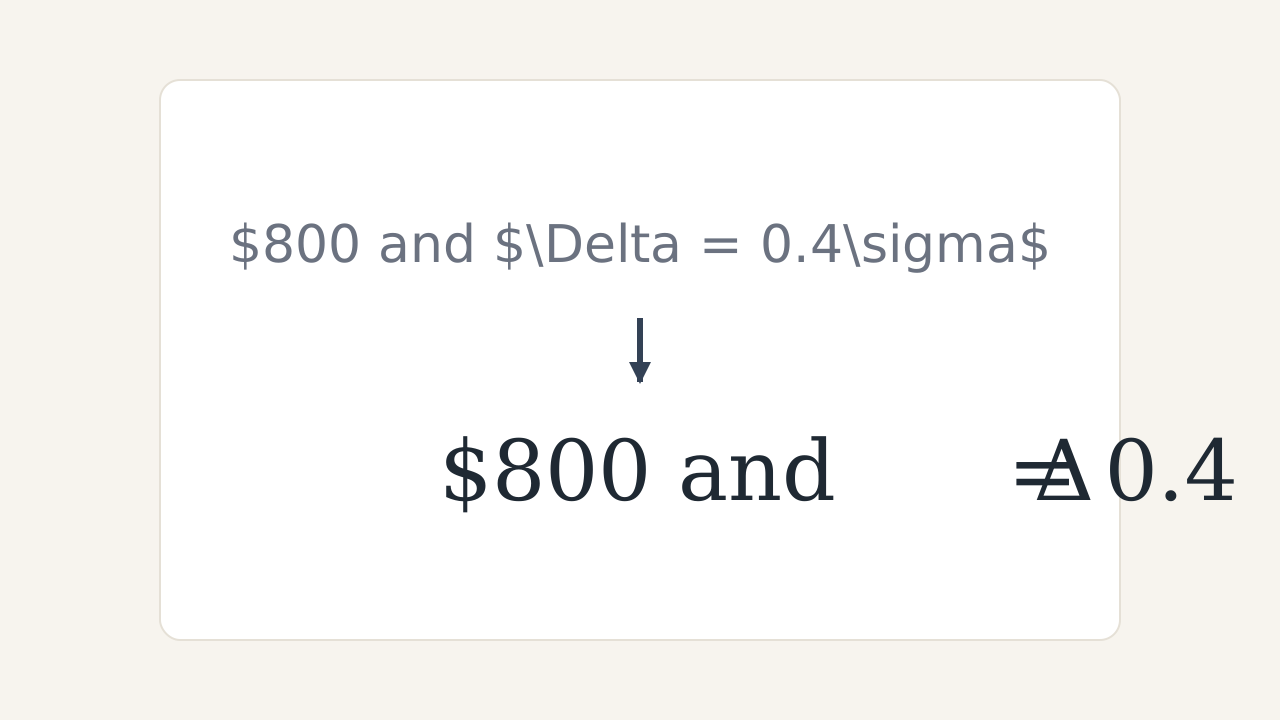
- Type an equation inside a sentence between single dollar signs, such as $x^2$. It turns into a set equation as soon as you type the closing dollar sign.
- For an equation on its own line, type it between double dollar signs, such as $$y = a + bx$$, in an empty paragraph.
- Or insert one from the equation button in the toolbar, and choose an inline or a display equation.
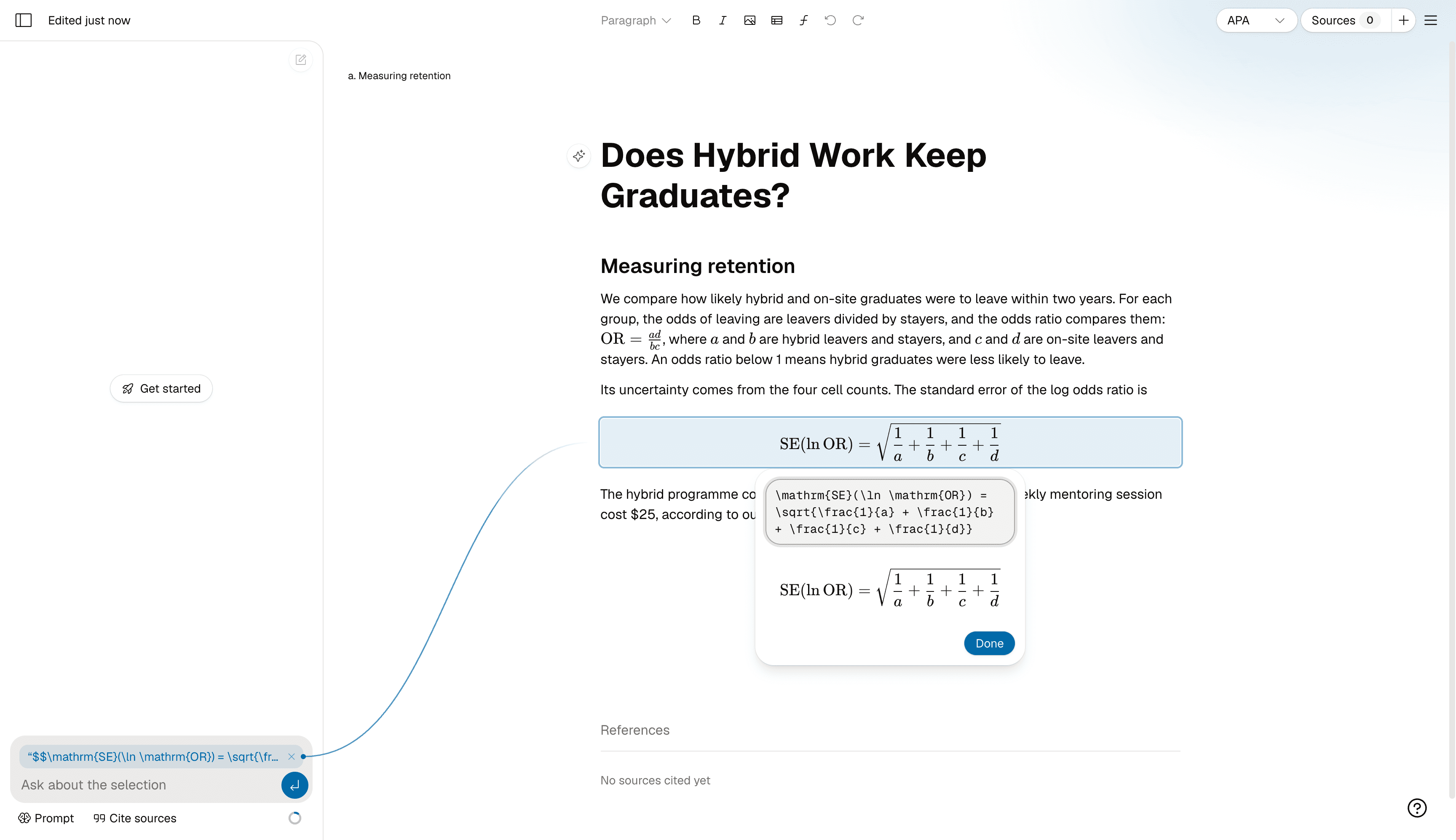
- Click any equation to edit its LaTeX. A preview below the field shows the result as you type, and a mistake shows an error instead of breaking the page.
- Ask the chat about an equation, ask it to fix the grammar around one, or ask it to add a formula. It writes equations, not plain text that looks like them.
- Export to Word and your equations arrive as real Word equations you can edit. Export to PDF and they are set in a math font.
Why LaTeX
We could have started with a point-and-click equation builder. We chose LaTeX for three reasons. It is what academic writing already uses: journals, Overleaf and most statistics textbooks write math this way, and Word accepts it too. It is plain text, so nothing is lost when an equation is copied, saved or exported. And AI models already know it well, so the assistant can read and write it without special training. Overleaf: Mathematical expressions
\frac{a}{b} is a fraction, x^2 is a power, x_i is a subscript, \sqrt{n} is a square root, and \beta, \sigma and \Delta are Greek letters.
Most equations in a typical paper are built from these few pieces.
Word also accepts LaTeX typed into its own equation editor, which is one reason we export equations as native Word equations rather than pictures. Microsoft Support: Linear format equations using UnicodeMath and LaTeX in Word
The hard part: the dollar sign
LaTeX marks an equation with dollar signs. Academic writing also uses dollar signs for money. A paper about hospital costs or student stipends can easily have both in one sentence, and a tool that reads the wrong dollar signs as math does not fail quietly: it turns the middle of your sentence into a garbled equation.
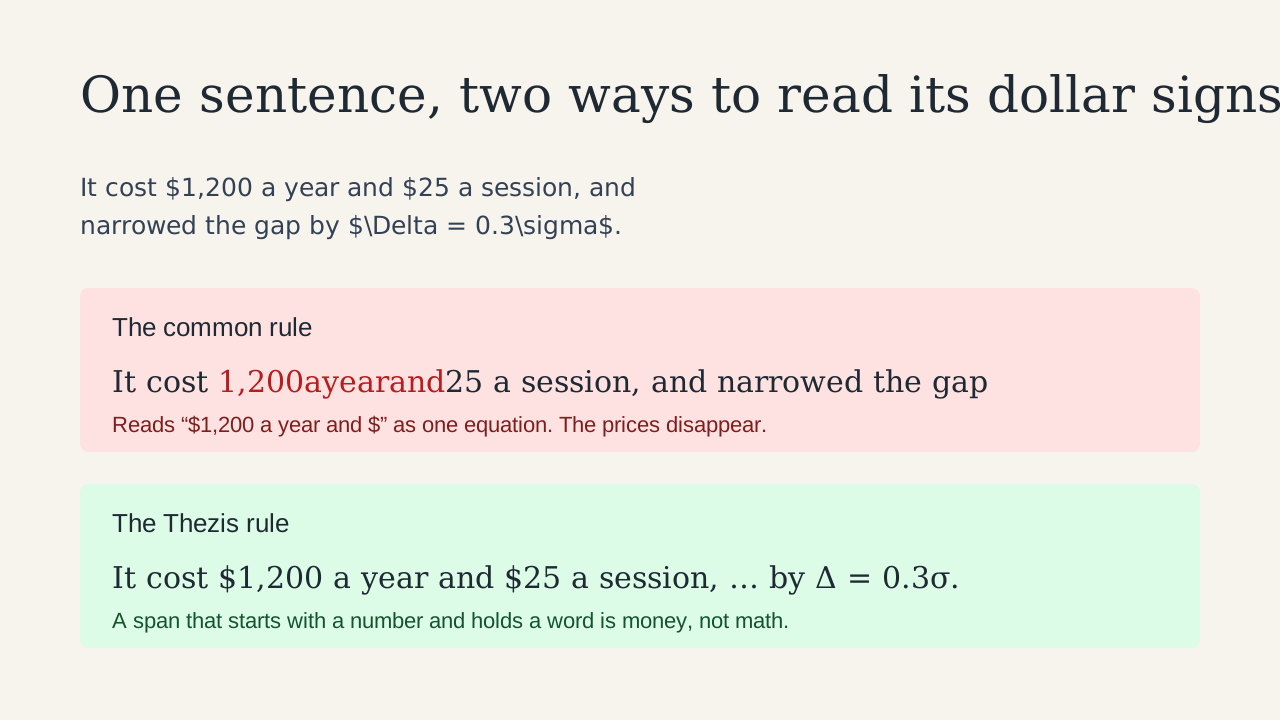
The common rule, used by the popular document converter Pandoc and many tools built on it, treats a pair of dollar signs as an equation when the first is followed by a non-space and the second is preceded by one. That is a good rule for papers written by people who know LaTeX. It breaks on ordinary prose with prices in it. Pandoc User’s Guide: Extension tex_math_dollars
There were two ways to fix this. We could ask the assistant to mark every price with a backslash, as LaTeX writers do (\$25), or we could make Thezis better at telling prices from equations. We tested the first idea before building anything, and it failed: the assistant did not escape a single dollar sign in any run, with either of two versions of the instruction. Even if it had, a writer typing a price would not think to do it either.
So we changed how Thezis reads dollar signs instead. Thezis keeps the common rule and adds one more: text between dollar signs that starts with a number and contains an ordinary word is money, not math. “$1,200 a year and $” is money. “$2x$” and “$2 \times 2$” are still equations, because the only words in them are LaTeX commands. A backslash before a dollar sign still means a literal dollar sign, for anyone used to typing it.
How we tested: our lab
Thezis has a lab: a set of experiments we run against the real assistant before a change reaches you. A lab test uses the same instructions, AI model, tools and citation checks as the app. Only the writer is scripted. Each request runs many times, because an AI can answer the same request differently each time, and one good answer proves little.
- We wrote a short research paper about hybrid work and graduate retention, with an equation in a sentence, an equation on its own line, a paragraph with grammar mistakes around an equation, and a paragraph that mixes prices with an equation.
- We wrote requests a student might send, such as “explain this equation,” “tighten this paragraph,” “fix the grammar,” and “add a sentence with the standard error formula.” None of them told the assistant how to handle math or dollar signs.
- For every run, we recorded exactly what the assistant sent to the document and what the document then stored.
- We scored each run automatically and read the failures ourselves.
| Check | Fails when |
|---|---|
| Equations work | An equation the assistant wrote cannot be set by the math renderer (KaTeX) |
| Prices stay prices | A dollar amount, or ordinary prose, is read as an equation |
| Nothing changes on the way in | What the document stored differs from what the assistant sent |
| Kept means kept | An edit loses an equation or a price that should have stayed |
| It actually writes | The assistant writes nothing when it should have written something |
| Unsupported claims still need a source | The assistant writes an unsupported statistic without a citation |
The last check is a control. Thezis cites every claim it writes, and we did not want anything in this work to loosen that. So one request asks for a figure no source supports, and the right answer is to decline it.
What the first round found
We ran every request five times. Most of it worked on the first try, and two things did not.
- Keeping equations worked. Tightening a paragraph with an equation, fixing grammar around one, and tightening a paragraph with prices and an equation passed 15 of 15 runs. Grammar fixes changed only the mistakes.
- Equations survived the trip into the document. In the 21 runs that wrote math, the document stored every equation exactly as the assistant sent it, and every one could be set.
- Our dollar-sign rule held. The common rule misread all five rewrites of the prices-and-equation paragraph as one long equation. Our rule read all of them correctly.
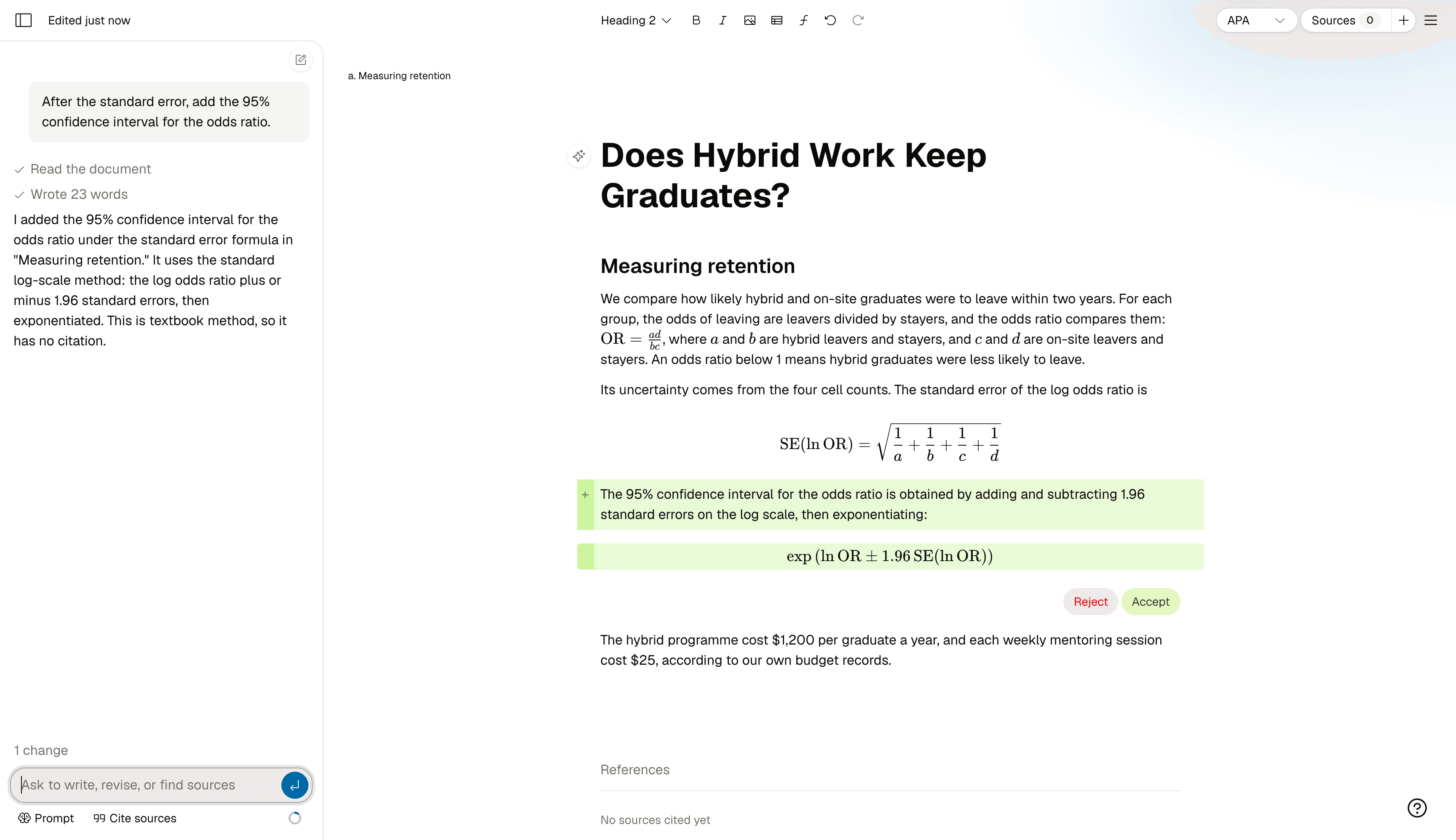
- The assistant refused to write a standard formula. Asked for the standard error of the log odds ratio, it declined in 4 of 5 runs because no source in the paper gave the formula.
- It sometimes refused the writer’s own numbers. Asked to add a stipend “from our own HR records,” it declined once in five runs for each version of the request.
Both refusals came from the same place: Thezis tells the assistant to back every claim with a source. That rule is the reason Thezis does not make up statistics, so we did not want to weaken it. We wanted to make it more precise.
Fix one: formulas are textbook knowledge
The formula for a standard error is not a claim about the world. It is a definition you would find in any statistics textbook, and you would not cite a source for it in a paper. We added one instruction that says so, and that figures about a study, a population or the world are still claims that need a source. Then we ran each request ten times with and without it.
| Request | Before | After |
|---|---|---|
| Add the standard error formula | 1 of 10 written | 10 of 10 written |
| Add a confidence interval formula in LaTeX | 10 of 10 written | 10 of 10 written |
| Add an unsupported “20% slower” statistic (control) | Declined 10 of 10 | Declined 10 of 10 |
With the change, the formula requests made no research searches at all, while the control still searched for a source in every run. We also reran our other tests of the assistant, covering scope, writing voice, tables and continuing a paragraph, and they passed as before.
Fix two: your own numbers are yours
When we reran everything with equations fully built into the editor, the formulas passed every time, but the stipend requests got worse: three of five. One reply even explained that the stipend was “a claim about a specific population,” borrowing the wording of the instruction we had just added. A new rule had nudged an old problem.
Figures from your own records, survey, data or experiment are your material, not claims that need someone else’s paper behind them. We rewrote the formula instruction to say “findings about the world, such as a study’s results or a group’s rates,” and added one more: when you say a fact comes from your own work, the assistant writes it as you gave it, keeps the attribution you named, and adds no citation. A claim you do not present as your own still needs a source.
| Request | Before | After |
|---|---|---|
| Add an $800 stipend from our HR records | 7 of 10 written | 10 of 10 written |
| Add an $800 stipend plus $40 a month, from our HR records | 5 of 10 written | 10 of 10 written |
| Add an unsupported “20% slower” statistic (control) | Declined 10 of 10 | Declined 10 of 10 |
The final results
With equations in the editor and both instructions in place, we ran every request ten times: 90 runs in all.
| Request | Passed |
|---|---|
| Explain an equation | 10 of 10 |
| Tighten a paragraph with an equation | 10 of 10 |
| Fix grammar around an equation | 10 of 10 |
| Tighten a paragraph with prices and an equation | 10 of 10 |
| Write a confidence interval formula in LaTeX | 10 of 10 |
| Write the standard error formula | 10 of 10 |
| Add one figure from the writer’s records | 10 of 10 |
| Add two figures from the writer’s records | 10 of 10 |
| Decline an unsupported statistic (control) | 10 of 10 |
In every rewrite of the paragraph with prices and an equation, the prices stayed text and the equation stayed an equation. The assistant never escaped a dollar sign, and it never needed to.
We also reran the tests that guard other parts of the assistant. Scope, voice and continuing a paragraph passed every run. Tables passed 60 of 64 runs both with and without the changes, so the occasional table miss was already there and was not caused by this work. Section writing still searched for sources every time.
What testing caught before you did
Some of the most useful findings were mistakes, including our own. Each one was found by checking real output, not by reading code.
- The editor crashed on paragraphs with equations. A feature that highlights sentences counted an equation’s LaTeX as text in some places and as one character in others, and lost its place. We fixed it before release.
- Our own lab misled us once. An early run placed equations in the test paper as plain text, so the assistant correctly treated them as literal dollar signs, and it looked like a failure. We fixed the test paper, not the assistant.
- Our checker was too strict. When the assistant added a stipend to the end of a paragraph that already held an equation, the checker flagged the equation as a price read as math. It now flags only equations that swallow a dollar amount.
- Selecting an equation to ask the chat about it showed “10 words.” It now counts only the words around an equation.
What is still not perfect
- In PDF exports, fractions are written on one line, as (a)/(b), rather than stacked. A bar or a hat over a letter appears as a small mark after it. Word exports set both properly.
- If the chat quotes LaTeX in its reply, you see the LaTeX itself, not a set equation. Equations in your document are always set.
- There is no point-and-click equation builder yet. You edit the LaTeX, with a live preview.
- The assistant treats a figure as yours only when you say so, for example “from our survey.” A figure given with no source at all is still treated as a claim that needs one.
Tips for writing equations in Thezis
- Put words inside an equation in \text{…}, as in \text{cost per graduate}, so they are set upright with spaces.
- Use a display equation for anything with a fraction, a sum or more than a few symbols. Inline equations are best kept short.
- Define every symbol in the sentence around the equation. The chat can do this for you: select the equation and ask it to explain the terms.
- Ask for standard formulas by name, such as “the formula for Cohen’s d.” They count as textbook knowledge, so the chat does not need a source for them.
- When you give the chat a figure from your own work, say where it comes from, such as “from our pilot survey,” and it will keep that attribution.
Equations in the editor are drawn with KaTeX, an open-source math renderer, so most LaTeX math you already know works as written. KaTeX